A1625 apple tv какая модель
How To Figure Out the Model Name and Number of Your Apple TV.
Did you know that 2017 is the 10-year anniversary of the iPhone? (Hard to believe so much change and improvement has come in such a short period…alas, I’ll talk more about that later this year.)
But more surprising: the Apple TV is also a 10 year old!
So the Apple TV (once a hobby, according to Apple), is now on its fourth generation. Here’s how you find out your model’s identity.
4th Generation, Model A1625
- Introduced 2015
- Black with Siri Remote (or Apple TV Remote in countries where Siri has yet to be introduced)
- Go to Settings>About for the serial number and more information
3rd Generation, Model A1427 or A1469
Note: the 2nd and 3rd Generation models look alike, so the model number is more important.
- Introduced 2012
- Black with Aluminum Remote
- Go to Settings>General>About for the serial number and more information
2nd Generation, Model A1378
Note: the 2nd and 3rd Generations models look alike, so the model number is more important.
- Introduced 2010
- Black with Aluminum Remote
- Go to Settings>General>About for the serial number and more information
1st Generation, Model A1218
- Introduced 2007
- Silver with White Remote
- Go to Settings>General>About for the serial number and more information
Important
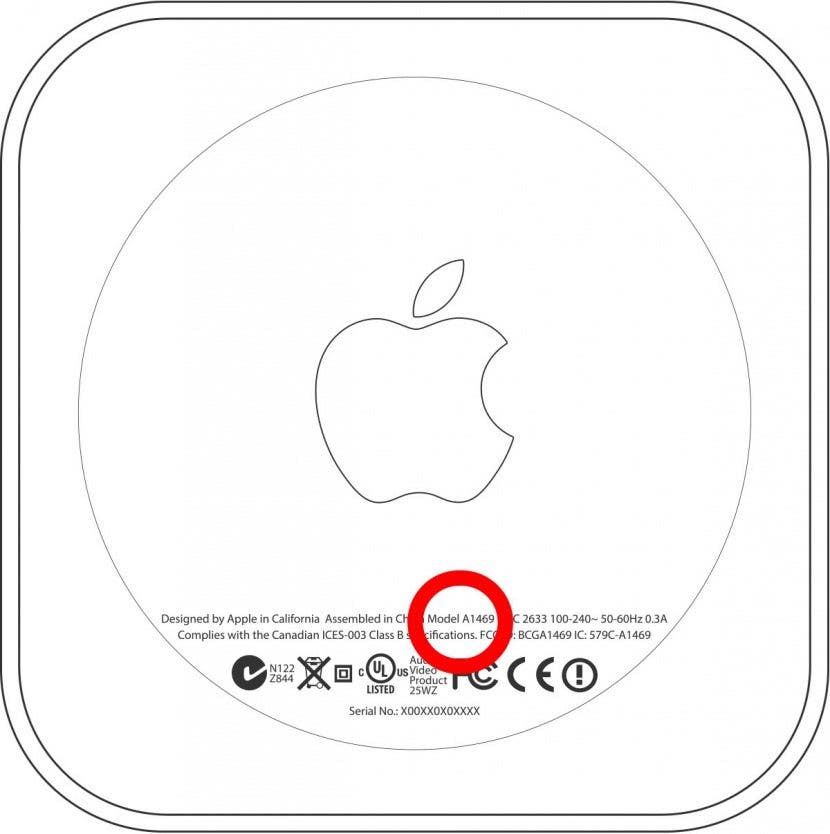
- If your Apple TV will not turn on, you can also find the model number on the bottom of the device.
For addition information, including photos, see this Apple Support Article.
Apple TV Models: How to Know Which TV Apple Generation You Own
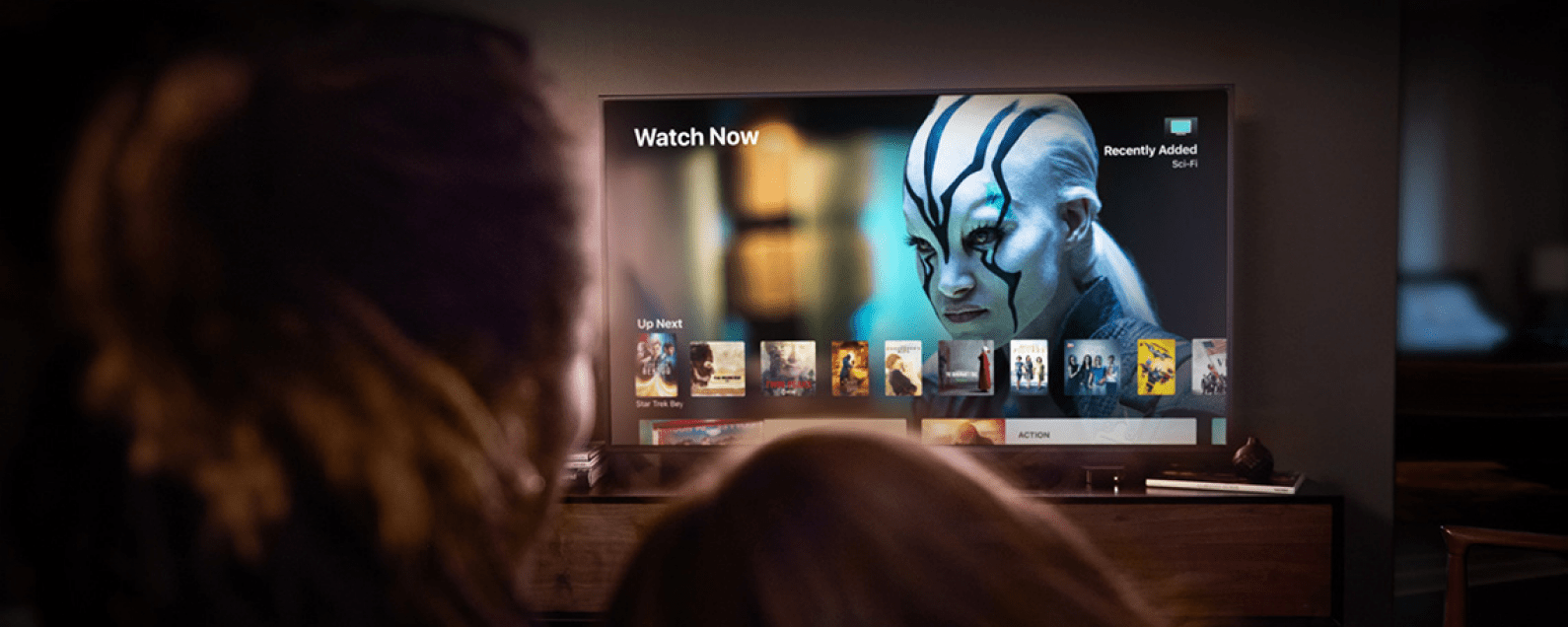
If you’re thinking of upgrading your Apple TV model, you may be wondering what Apple TV you have, so you can figure out the specs and value of your current device. Since the set-top boxes look similar on all Apple TV generations, it isn’t immediately obvious which is which. Fortunately, there are several ways to know which Apple TV generation you own.
Apple TV Models: How to Know Which TV Apple Generation You Own
Want to know which Apple TV generation you own? Here’s how to tell which Apple TV model you have, and learn all about its features and capabilities. For more great Apple TV info, check out our free Tip of the Day.

Jump To:
- Which Apple TV Model Do I Have?
- Check the Set-Top Box to Find Out Your Apple TV Model
- Apple TV Generations Model Number Lookup
Which Apple TV Model Do I Have?
To find out which Apple TV model you have, you will need to locate your Apple TV’s model number. All Apple TV models have a model number code that begins with the letter A followed by four numbers. This five-digit code will help you identify which version of the Apple TV you have. Once you have your model number, use the table below for easy lookup!
Here’s how to find the model number on your Apple TV using the Settings app.
- Go to the Apple TV Home Screen.
- Open the Settings app.

Use the Set-Top Box to Find Out Which Apple TV Model You Have
Another way to look for your Apple TV model number, which will help you learn which Apple TV generation you have, is to:
- Pick up the Apple TV box.
- Flip it over to see the label on the bottom, on which you’ll find the Apple TV model number.
Apple TV Generations Model Number Lookup
Use this table to find out which Apple TV model you’re using. You can click the links to learn more about each Apple TV and its features to help you narrow down exactly which Apple TV model you have.
Apple TV Generation
Apple TV Models & Features
On certain models, you can actually look at the back of the set-top box and examine the ports and connectors. The number and types of ports can help you identify which Apple TV model you have! Otherwise, there are some other identifying features of the various generations of Apple TV.
If you’d rather jump to the Apple TV specs for a specific model instead of scrolling through, you may also click one of the following links:
- Apple TV 4K (3rd Generation)
- Apple TV 4K (2nd Generation)
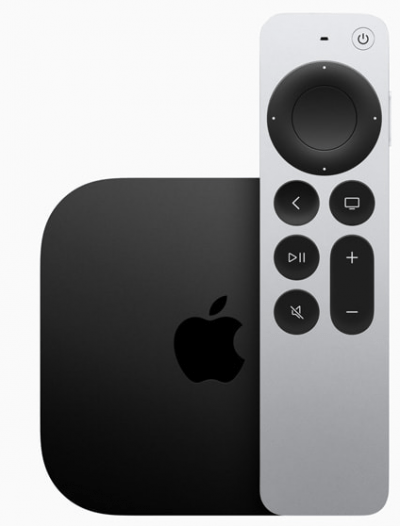
Apple TV 4K (3rd Generation): A2843
The latest Apple TV model has a few improvements over last year’s version.
- Connections:
- HDMI 2.1
- Gigabit Ethernet
- 802.11ac Wi‑Fi with MIMO; simultaneous dual band (2.4GHz and 5GHz)
- Bluetooth 5.0 wireless technology
- IR receiver
Apple TV 4K (2nd Generation):
This Apple TV model came with quite a few upgrades from the previous release in 2017!

- Connections:
- HDMI 2.1
- Gigabit Ethernet
- 802.11ac Wi‑Fi with MIMO; simultaneous dual band (2.4GHz and 5GHz)
- Bluetooth 5.0 wireless technology
- IR receiver
Apple TV 4K: Model A1842
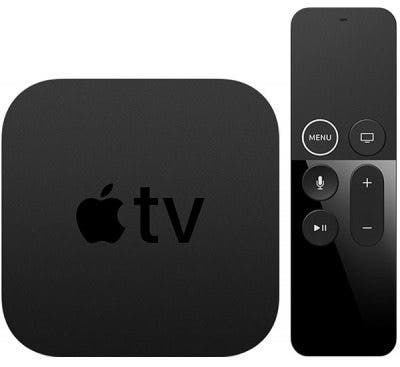

- Connections:
- HDMI 2.0a (2160p, Dolby Vision, and HDR10)
- Gigabit Ethernet
- 802.11ac Wi‑Fi with MIMO; simultaneous dual band (2.4GHz and 5GHz)
- Bluetooth 5.0 wireless technology
- IR receiver
Apple TV HD: Model A1625
Please note that this Apple TV model was previously called Apple TV (4th generation).
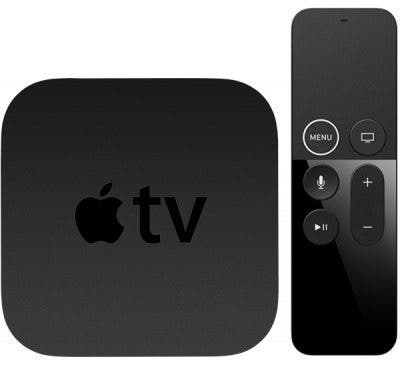
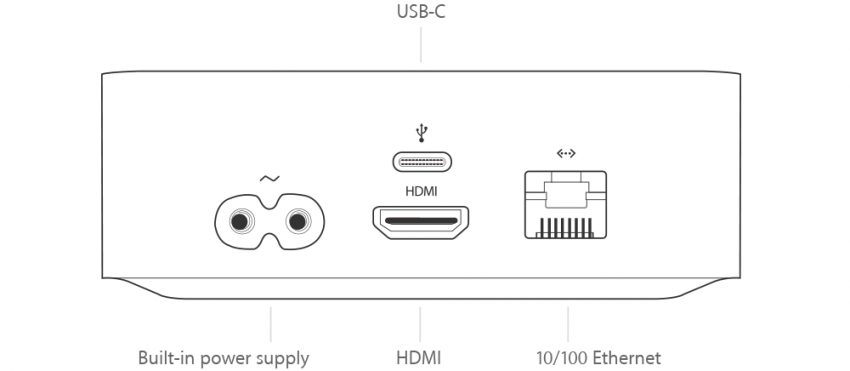
- Connections:
- HDMI 1.4 (720p or 1080p)
- 10/100BASE-T Ethernet
- Wi-Fi (802.11a/b/g/n/ac with MIMO)
- Bluetooth 4.0 wireless technology
- IR receiver
- USB‑C (for service and support)
Apple TV (3rd Generation): Model A1427 or A1469

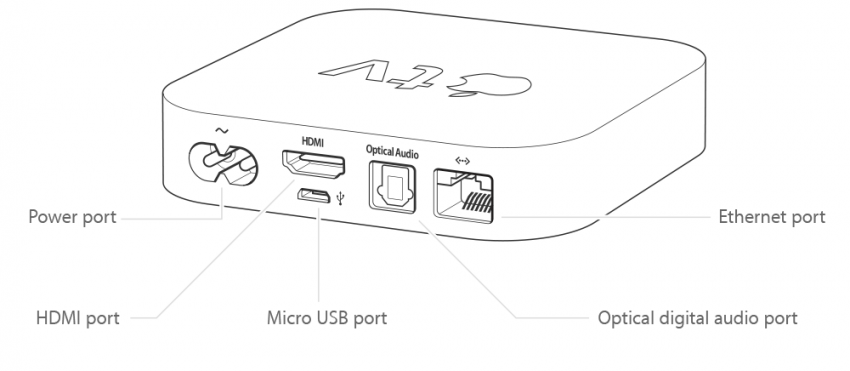
- Connections:
- HDMI (720p or 1080p)
- 10/100BASE-T Ethernet
- Wi-Fi (802.11a/b/g/n)
- Optical audio
- IR receiver
- Micro-USB (for service and support)
Apple TV (2nd Generation): Model A1378

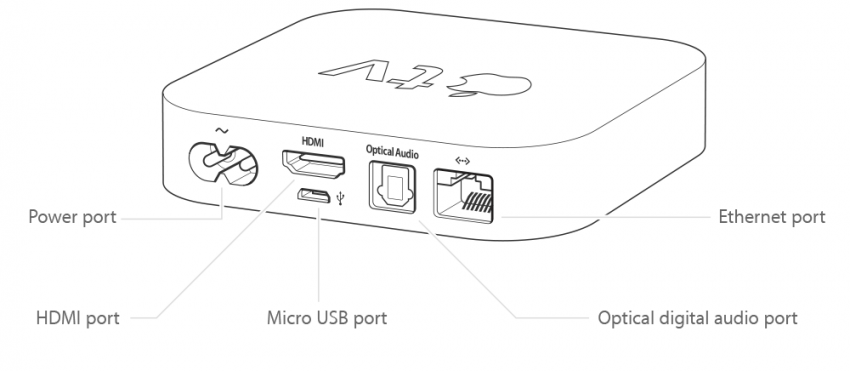
- Connections:
- HDMI (720p)
- 10/100BASE-T Ethernet
- Wi-Fi (802.11a/b/g/n)
- Optical audio
- IR receiver
- Micro-USB (for service and support)
Apple TV (1st Generation): Model A1218

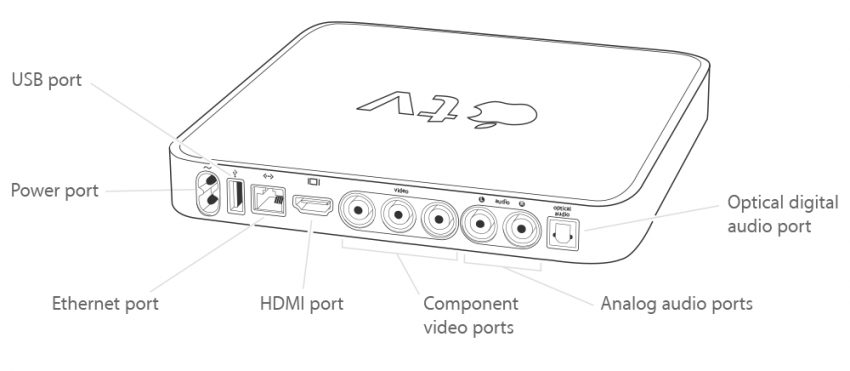
- Connections:
- HDMI and component video (480p or 720p)
- 10/100BASE-T Ethernet
- Wi-Fi (802.11b/g/n)
- Optical and RCA stereo audio
- IR receiver
- USB 2.0 (for service and support)
Now that you’ve identified which Apple TV model you have, you can learn a lot about which features your Apple TV has compared to other models. We’re here to help with all your other Apple TV questions, as well, including how to download apps on your Apple TV, what to do if your Apple TV remote is not working, and even how to use your iPhone as an Apple TV remote.
All images courtesy of Apple
Topics
Author Details

Author Details
Olena Kagui
Olena Kagui is a Feature Writer at iPhone Life. In the last 10 years, she has been published in dozens of publications internationally and won an excellence award. Since joining iPhone Life in 2020, she has written how-to articles as well as complex guides about Apple products, software, and apps. Olena grew up using Macs and exploring all the latest tech. Her Maui home is the epitome of an Apple ecosystem, full of compatible smart gear to boot. Olena’s favorite device is the Apple Watch Ultra because it can survive all her adventures and travels, and even her furbabies.
Article Spotlight
Our Favorite Smart Hearing Aids


Hearing well can transform the way we experience the world, and with Eargo 7, no compromises are necessary. These virtually invisible hearing aids are comfortable, water resistant, easy to charge, and automatically optimize your experience for changing sound environments!
Featured Products

Looking for a way to easily manage the data across all of your devices without using a cloud service? iMazing provides secure and powerful tools that fill important gaps in Apple’s default offering. Since 2008 they’ve been the world’s most trusted software to transfer and save your messages, music, files and data from your iPhone or iPad to your Mac or PC. Learn more.
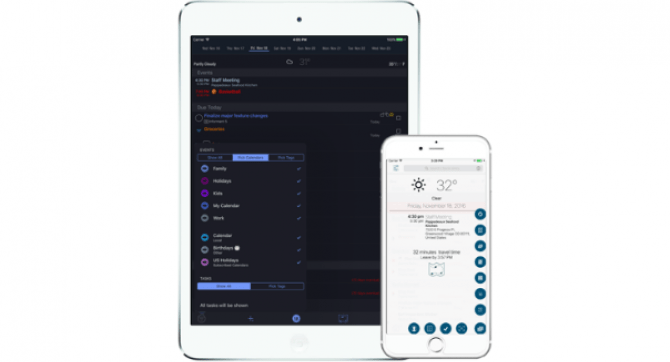
Now you can try Informant 5 for free and experience a productivity boost by managing projects with tasks and notes, syncing your calendar among all your devices, enjoying a user-friendly 30-day calendar view, and so much more. Informant 5 features SmartBar navigation which makes it so much easier to use and master this calendar app. Plus, you can use it almost anywhere thanks to Dark Mode. With a dark background, you can check in on your tasks and schedule anywhere, even the movie theater. Upgrade to the best calendar app and task manager for iOS! Embrace an «out with the old, in with the new» spirit with Informant 5.
How to Identify Apple TV Model and Generation in 3 Ways
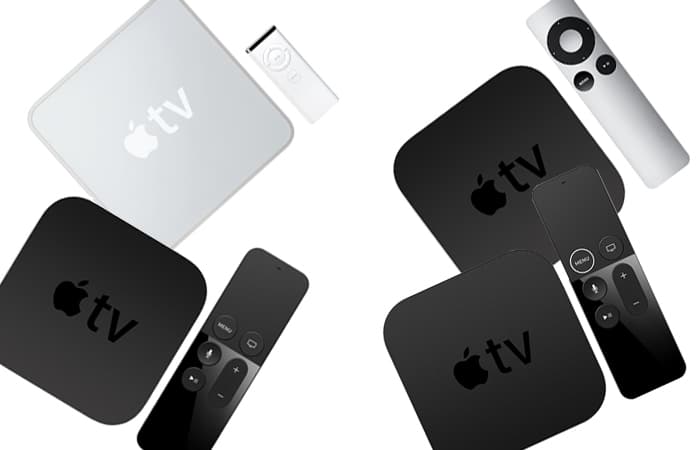
While internal – software and hardware capabilities can differentiate the devices – analyzing the exterior can also help you to identify which Apple TV you own. If you are also looking for ways to find out the model of your Apple TV, simply read our guide below.
1. Identify Apple TV Model by Model Number
All the different Apple TV’s can be identified by their different model numbers. You must have noticed that their model numbers begin with the letter ‘A’ and link directly to their specific device. You can identify the model number of your particular device by:
- Going to settings tab on the TV > General > About.
- Checking the bottom of your Apple TV.
- Checking the box of the ATV.
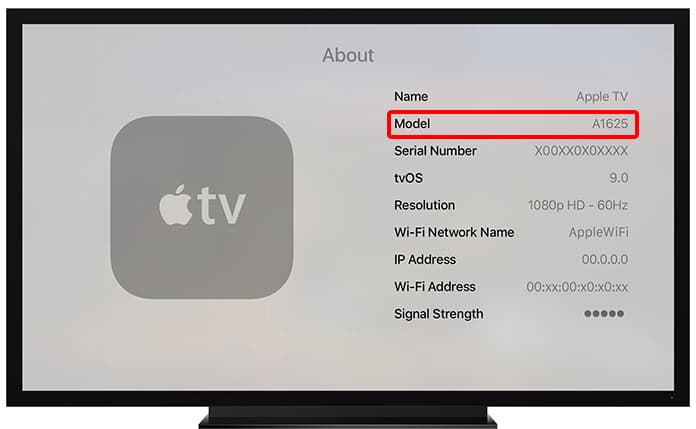
After you find the model number, you can see our table below to identify Apple TV model or generation easily.
Apple TV Model Model number Year Color Remote Apple TV (1 st Gen.) A1218 2007 Silver White Apple TV (2 nd Gen.) A1378 2010 Black Aluminum Apple TV (3 rd Gen.) A1427 or A1469 for Rev A 2012 Black Aluminum Apple TV (4 th Gen.) A1625 2015 Black Siri Remote or Apple TV remote Apple TV 4K A1842 2017 Black Siri Remote or Apple TV Remote 2. Identifying by ports and connectors:
Each Apple device has specific ports and connectors that are respective to the model which is described below:
- Apple TV (1 st Generation)
This device contains the most connectors and ports out of the five models. It contains a power port, a port for HDMI, a component video port, Ethernet port, an optical digital audio port, an analog audio port and a USB 2.0 for service and support.
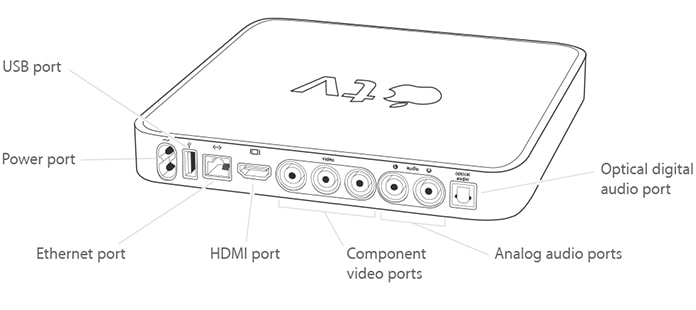
The networking capabilities of the first generation Apple TV include 10/100 BASE-T Ethernet and Wi-Fi (802.11 b/g/n), as well as an IR receiver.
- Apple TV (2 nd Generation and 3 rd Generation)
Both the models are almost similar and have slightly less ports and connectors than the 1 st generation model. The only difference lies in the pixels of both the models as the 3 rd generation model has more (720 p or 180 p).
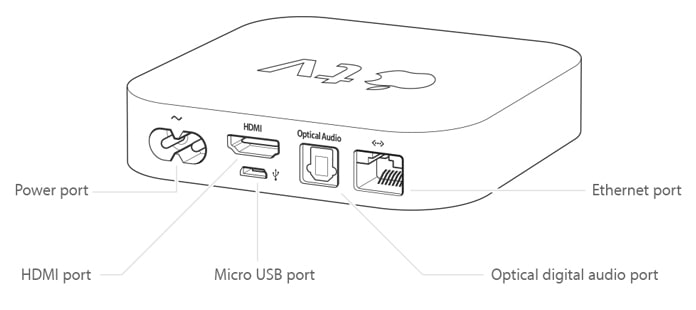
The ports are also identical in both the models – a power port, Ethernet port, optical digital audio, HDMI port and micro-USB.
The models also have the same networking capabilities – Wi-Fi (802.11a/b/g/n) and 10/100BASE-T Ethernet – and include an IR receiver.
- Apple TV (4 th Generation)
The 4 th generation has only four ports that are used for power supply, HDMI 1.4 (720 p or 1080 p), Ethernet and USB – C.
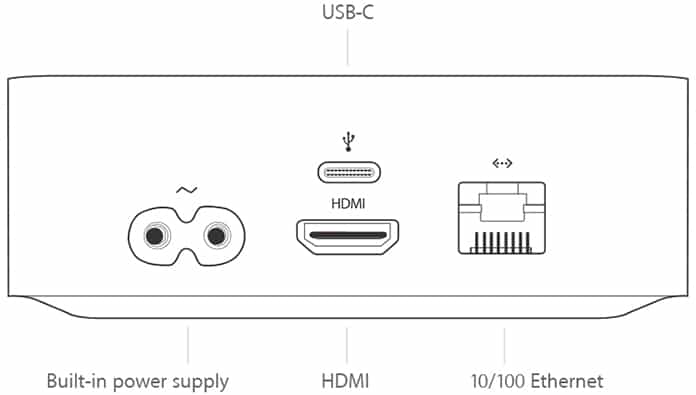
The 4 th generation model also includes 10/100BASE-T Ethernet, WI-Fi (802.11a/b/g/n/ac with MIMO) and Bluetooth 4.0 wireless technology. The Apple TV also comes with an IR receiver.
- Apple TV 4K
Last but not the least, the Apple TV 4K comes with only three ports – HDMI (2160 p), a Gigabit Ethernet and a power port.
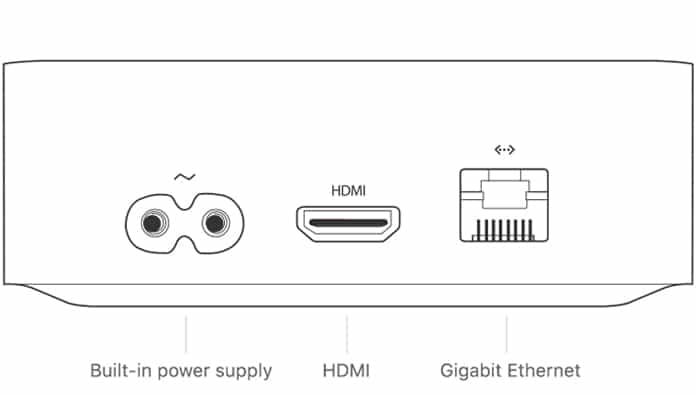
The networking capabilities consist of Gigabit Ethernet, Wi-Fi (802.11ac with MIMO) and Bluetooth 5.0. And like all the other Apple TV models, the Apple TV 4K comes with an IR receiver.
3. Identify Apple TV Model by its Specs
You can also identify Apple TV model by its specs. Below are the specs for all Apple TV generations. You can compare them and find out which Apple TV model do you have.
Size and Weight:
The five Apple TV models differ slightly in size and weight making it easy for the consumers to tell them apart.
- Apple TV (1st Generation) = 19.5 x 19.5 x 2.8
- Apple TV (2 nd Generation) = 9.9 X 9.9 X 2.3
- Apple TV (3 rd Generation) = 9.9 x 9.9 x 2.3
- Apple TV (4 th Generation) = 9.9 x 9.9 x 3.3
- Apple TV 4K = 9.9 x 9.9 x 3.5
- Apple TV (1st Generation) = 1.1
- Apple TV (2 nd Generation) = 0.27
- Apple TV (3 rd Generation) = 0.27
- Apple TV (4 th Generation) = 0.43
- Apple TV 4K = 0.43
Internal Differences:
As you must already know, the former Apple TV models were built around channels. This means that the viewers had access to limited content as companies had to collaborate with the tech-giant to have their content hosted. And hard to believe but the first generation models were even incapable of streaming.
The good news is that in 2015, Apple revolutionized many features including the introduction of tvOS (operating system essential for Apple TV), an app store, and Siri. This changed the face of TV completely and allowed users to play games, access social media, and of course, stream their favorite channels through a Siri remote.
The Apple TV 4K announced along with the iPhone 8 and iPhone X is the next generation of Apple TV products that comes with the latest version of tvOS. The hardware technology of the Apple TV 4K supports 4K ultra-HD and HDR streams. It also includes an A10x fusion chip which means the new generation TV will be twice as fast than the previous models. Lastly, the 4K model includes Dolby vision that enhances the colors and brightness of the content.
Apple TV Model Capacity Netflix App Store Games Siri Apple TV (1 st Gen.) 40 or 160 GB No No No No Apple TV (2 nd Gen.) NA Yes No No No Apple TV (3rd Gen.) NA Yes No No No Apple TV (4 th Gen.) 32 or 64 GB Yes Yes Yes Yes Apple TV 4K 32 or 64 GB Yes Yes Yes Yes With these tips, you can easily identify Apple TV model and generation. Let us know how what you think of this article in the comments below.
A1625 apple tv какая модель
Узнайте, как идентифицировать Apple TV по номеру модели и другим данным.
Apple TV HD
Ранее Apple TV (4-го поколения)
Год выпуска: 2015
Цвет: черный
Емкость: 32 ГБ или 64 ГБ
Номер модели: A1625
Siri Remote (1-го поколения) или Apple TV Remote (1-го поколения) 1,2Apple TV (3-го поколения)
Год выпуска: 2012
Цвет: черный
Номер модели: A1427 или A1469 для Rev A
Apple Remote (алюминий)Apple TV (1-го поколения)
Год выпуска: 2007
Цвет: серебристый
Емкость: 40 или 160 ГБ
Номер модели: A1218
Apple Remote (белый )Идентификация функций
См. порты и разъемы для каждой модели ниже.
Apple TV 4K (2-го поколения)
- HDMI 2.1 (до 4K60 HDR10 и видеовыход Dolby Vision)
- Гигабитный Ethernet
- 802.11ax Wi-Fi 6 с MIMO; одновременная работа в двух диапазонах (2,4 ГГц и 5 ГГц)
- Беспроводная технология Bluetooth 5.0
- Поток
- ИК-приемник
Apple TV 4K (1-го поколения)
- HDMI 2.0a (2160p, Dolby Vision и HDR10)
- Гигабитный Ethernet
- 802.11ac Wi-Fi с MIMO; одновременная работа в двух диапазонах (2,4 ГГц и 5 ГГц)
- Беспроводная технология Bluetooth 5.0
- ИК-приемник
Apple TV HD
- HDMI 1.4 (720p или 1080p)
- 10/100BASE-T Ethernet
- Wi-Fi (802.11a/b/g/n/ac с MIMO)
- Беспроводная технология Bluetooth 4.0.
- ИК-приемник
- USB-C (для обслуживания и поддержки)
Apple TV (3-го поколения)
- HDMI (720p или 1080p)
- 10/100BASE-T Ethernet
- Wi-Fi (802.11a/b/g/n)
- Оптический звук
- ИК-приемник
- Micro-USB (для обслуживания и поддержки)
Apple TV (2-го поколения)
- HDMI (720p)
- 10/100BASE-T Ethernet
- Wi-Fi (802.11a/b/g/n)
- Оптический звук
- ИК-приемник
- Micro-USB (для обслуживания и поддержки)
Apple TV (1-е поколение)
- HDMI и компонентное видео (480p или 720p)
- 10/100BASE-T Ethernet
- Wi-Fi (802.11b/g/n)
- Оптический и RCA-стереозвук.
- ИК-приемник
- USB 2.0 (для обслуживания и поддержки)
Определите свою модель
Вы можете найти номер модели вашего Apple TV в трех местах.
Проверить настройки
На главном экране Apple TV выберите «Настройки» > «Основные» > «О программе» и проверьте модель.
Проверьте нижнюю часть Apple TV
Чтобы узнать номер модели, проверьте информационную наклейку в нижней части Apple TV.
Установите флажок
Чтобы найти номер модели, проверьте заднюю часть коробки, в которой поставлялся ваш Apple TV.

сообщить об этом объявлении
- Apple TV 4K и Apple TV HD везде поставляются с одним и тем же пультом. В странах и регионах, поддерживающих Siri, пульт называется Siri Remote. В другом месте это называется Apple TV Remote. Siri работает на любом пульте, если в настройках Apple TV 4K или Apple TV HD выбраны язык и страна или регион, поддерживающие Siri.
- Предыдущие модели Apple TV HD поставлялись с пультом Siri Remote (1-го поколения) или Apple TV Remote (1-го поколения) без белого кольца вокруг кнопки «Меню».
Связанные руководства/ресурсы
Определите свою модель HomePod Узнайте, какая модель HomePod у вас есть. Год выпуска HomePod: 2018 Цвета: космический серый,…
Управление Apple TV с помощью Apple Watch Вы можете использовать Apple Watch в качестве пульта дистанционного управления для Apple TV, когда вы подключены…
Если у вас возникают трудности с использованием жестов для Apple Pencil (2-го поколения) на поддерживаемых моделях iPad, вы можете настроить…
Использование аксессуаров Bluetooth с Apple TV Узнайте, как подключить Bluetooth-наушники, клавиатуры, контроллеры и другие устройства к…

Существует несколько простых способов узнать, какой Apple TV у вас есть, помимо поиска по номеру модели, хотя это был бы самый простой способ узнать, какой из них у вас есть. Владельцы Apple TV также могут использовать различные внутренние различия и возможности программного обеспечения, чтобы определить, какой Apple TV у вас есть, включая tvOS, возможности потоковой передачи, поддержку Siri, доступность приложений/игр и многое другое.
Это может показаться запутанным, но на самом деле это проще, чем вы думаете — мы расскажем вам обо всем процессе идентификации Apple TV прямо здесь.
Определить по номеру модели
Знание номера модели помогает определить, какой Apple TV у вас есть. Все номера моделей начинаются с буквы «А» и относятся непосредственно к вашему конкретному устройству.Определить номер модели можно тремя способами: зайти в меню «Настройки», проверить нижнюю часть устройства или посмотреть на коробку, в которой поставлялось устройство.
Пульт дистанционного управления Apple
A1469 для версии A
Siri Remote с сенсорной панелью и микрофоном
Во-первых, вы можете определить номер своей модели, посетив раздел «Настройки» на Apple TV. Выберите «Настройки» > «Основные» > «О программе» и найдите номер модели.

Во-вторых, проверьте информационную наклейку на внешней нижней части Apple TV. Здесь вы найдете номер модели вашего устройства.

Наконец, взглянув на коробку, в которой прибыл ваш Apple TV, вы сможете определить, какой Apple TV у вас есть.
Определить по порту и соединителям
Каждое устройство имеет определенные порты и разъемы, соответствующие модели, и они также могут работать и имеют полезные идентификаторы.
Apple TV (1-е поколение)
У этого устройства больше всего разъемов и портов из пяти моделей.
Apple TV 1-го поколения содержит порт питания, порт HDMI (480p или 720p), порт компонентного видео, порт Ethernet, оптический цифровой аудиопорт, аналоговый аудиопорт и порт USB 2.0 (для обслуживания и поддержку).

Сетевые возможности включают 10/100BASE-T Ethernet и Wi-Fi (802.11b/g/n), а также ИК-приемник.
Apple TV (2-го поколения) и Apple TV (3-го поколения)
С немного меньшим количеством портов и разъемов Apple TV 2-го и 3-го поколений практически идентичны. Единственная разница заключается в том, что 3-е поколение поддерживает большее количество пикселей (720p или 1080p) для HDMI по сравнению с ограничением HDMI 2-го поколения 720p.


Обе модели имеют одинаковые порты: порт питания, порт Ethernet, оптический цифровой аудиовыход, порт HDMI и порт Micro-USB (для обслуживания и поддержки), а также одинаковые сетевые возможности — Wi-Fi (802.11a/b/ g/n) и 10/100BASE-T Ethernet, а также ИК-приемник.
Apple TV (4-го поколения)
У Apple TV четвертого поколения (вместе с 4K) всего четыре порта, но это все же на один больше, чем у модели 4K.
Четыре порта обеспечивают подключение питания, HDMI 1.4 (720p или 1080p), Ethernet и USB-C. Вы также найдете 10/100BASE-T Ethernet, Wi-Fi (802.11a/b/g/n/ac с MIMO) и беспроводную технологию Bluetooth 4.0, которая отличает его от своих предшественников.

Apple TV 4K
Наконец, Apple TV 4K, который в настоящее время доступен по цене 179 фунтов стерлингов, имеет только три порта: HDMI 2.0 (2160p), Gigabit Ethernet и порт питания. Порт USB-C просуществовал недолго, не так ли?
Также предлагаются улучшенные возможности подключения: Gigabit Ethernet, Wi-Fi (802.11ac с MIMO) и Bluetooth 5.0, доступные в варианте 4K.
Размер и вес
Пять моделей Apple TV немного отличаются по размеру и весу, что является еще одним простым способом определить, какая из них у вас.
Прибл. Размер (мм)
Телевизоры Apple TV второго и третьего поколения имеют одинаковый размер и вес, а модели четвертого поколения и модели 4K похожи. Самой уникальной моделью в отделе дизайна является оригинальный Apple TV размером примерно 19,5 x 19,5 x 2,8 см и весом 1,1 кг.
Приложения, игры и Siri
App Store работает в сочетании с tvOS, обновленным программным обеспечением Apple TV от Apple, которое дебютировало с Apple TV четвертого поколения в 2015 году. Помимо расширенной поддержки Siri, специального приложения Apple TV и многого другого, App Store предоставляет доступ к постоянно растущий ассортимент приложений и игр. На самом деле, на Apple TV доступно большинство, если не все, британских приложений для перехвата информации, и немногие телевизионные приставки могут похвастаться этим.
Если на вашем Apple TV есть App Store, скорее всего, у вас есть Apple TV четвертого или пятого поколения. Если нет, значит, у вас старая модель.
Apple выпустила несколько версий Apple TV, каждая со своими возможностями и функциями.
Если вы хотите узнать Apple TV какого поколения у вас есть, это можно сделать несколькими способами.
Ознакомьтесь с продуктами, упомянутыми в этой статье:
Apple TV 4K (от 179,99 долларов США в Best Buy)
Как узнать Apple TV какого поколения у вас
Вот четыре способа узнать модель Apple TV.
Проверьте порты ввода и вывода
Задняя панель каждого Apple TV имеет различные входы и выходы, за исключением Apple TV 2 и Apple TV 3, которые имеют одинаковое расположение.
Все устройства Apple TV имеют разъем питания одинакового типа, но вот чем они отличаются в остальном.
- Apple TV 1-го поколения — единственная версия с компонентными видеовыходами.
- Apple TV 2-го и 3-го поколений оснащены портом HDMI, портом Micro USB, оптическим аудиопортом и портом Ethernet.
- Apple TV HD оснащен портом HDMI, портом USB-C и портом Gigabit Ethernet.
- Apple TV 4K имеет только порт HDMI и порт Gigabit Ethernet.
На Apple TV 4K блок питания находится слева, затем порт HDMI, а справа — порт Ethernet. яблоко
Проверьте нижнюю часть устройства
В нижней части Apple TV указаны технические характеристики вашего устройства.
Первая строка ближе к середине должна содержать номер модели вашего Apple TV.
Проверьте настройки
2. Выберите «Общие».
3. Выберите «О программе».
4. На экране «О программе» несколькими строками ниже вы найдете номер своей модели.
- Номера моделей: A1218 для 1-го поколения, A1378 для 2-го поколения, A1427 или A1469 для 3-го поколения, A1625 для Apple TV HD и A1842 для Apple TV 4K.
Проверьте приставку Apple TV
Если у вас все еще есть коробка, в которой поставлялся Apple TV, номер модели будет указан на обратной стороне коробки.
Сопутствующее освещение от How To Do Everything: Tech:
Как выключить Apple TV, переведя его в спящий режим, тремя разными способами
Как обновить Apple TV вручную или настроить автоматическое обновление в фоновом режиме
Как зарядить пульт Apple TV или заменить его батарею, если у вас более старая модель
Как включить Apple TV без пульта и управлять им с iPhone или iPad
Как закрыть приложения на Apple TV, чтобы ничто не замедляло работу системы в фоновом режиме
Райан Ариано вырос в Балтиморе, когда компьютеры Macintosh были на пике популярности, жил в Лос-Анджелесе, когда Blackberry уступили место iPhone, а сейчас живет в Джексон-Хоул, где всю его жизнь связывает Bluetooth. Он пишет на самые разные темы, но особенно любит заниматься техническим спектром. Узнайте больше о том, как наша команда экспертов тестирует и анализирует продукты на Insider, здесь.
Insider Inc. получает комиссию, когда вы покупаете по нашим ссылкам.
СМОТРИ ТАКЖЕ: Лучшие флешки и устройства для потоковой передачи мультимедиа: Roku, Apple TV и другие
СМОТРИТЕ СЕЙЧАС: смотрите мероприятие Apple Show Time в марте 2019 года за 13 минут
Значок шеврона Указывает на расширяемый раздел или меню, а иногда и на предыдущие/следующие параметры навигации.
Значок «Закрыть» Две пересекающиеся линии, образующие букву «X». Указывает способ закрыть взаимодействие или отклонить уведомление.
Вы можете захотеть узнать, какая модель Apple TV у вас есть, по разным причинам. Если вы продаете свой или просто хотите проверить совместимость программного обеспечения, узнайте, как узнать, какая у вас модель Apple TV.
С момента выпуска телеприставки в 2007 году было выпущено пять разных моделей Apple TV. Хотя оригинал больше напоминал Mac mini, чем нынешний дизайн Apple TV, с 2010 года используется компактный черный пластиковый корпус.
Ввод-вывод на задней панели дает представление о том, какая модель Apple TV у вас есть, но если вы не знаете, в чем отличия, следуйте приведенным ниже инструкциям, чтобы быстро определить свой Apple TV.
Как узнать, какая у вас модель Apple TV
- Найдите номер модели на нижней панели Apple TV (например, A1625).
- Сопоставьте его со списком Apple TV в документе поддержки Apple или со списком ниже.
Кроме того, если у вас нет быстрого доступа к нижней части Apple TV, вы можете найти номер своей модели, выбрав Настройки → Общие → О программе.
- Apple TV 4K — A1842
- Apple TV 4-го поколения — A1625
- Apple TV 3-го поколения — A1427 и A1469
- Apple TV 2-го поколения — A1378
- Apple TV 1-го поколения — A1218

Чтобы узнать больше о различиях между поколениями Apple TV, ознакомьтесь со справочным документом Apple.
Для получения дополнительной информации о том, как максимально эффективно использовать устройства Apple, ознакомьтесь с нашим руководством, а также со следующими статьями:
FTC: мы используем автоматические партнерские ссылки, приносящие доход. Подробнее.