Лучшие материнские платы для Intel i5 9400F
Intel Core i5 9400F – один из тех процессоров, что не получили такого же внимания, как Ryzen третьего поколения. Хоть у 9400F шесть ядер и шесть потоков как и у i5 9600K, последний стал популярнее, и стоит при этом на 100$ больше.
Всё потому, что люди любят разогнанные процессоры, но и недооценивать «аутсайдеров» как 9400 F не стоит. Intel i5 9400F — это лучший игровой процессор за 150$. Он выдаёт производительность, с которой процессоры за ту же цену рядом не стояли. Это один из выгоднейших процессоров и он должен стоять в каждой среднем игровом ПК.
Лучшие материнские платы для Intel i5 9400F
Сэкономите деньги и купите H310 или B360 материнскую плату, ведь i5 9400F не разгоняется. Существует много похожих плат на обоих чипсетах, правда они очень сильно отличаются по цене. Не беспокойтесь! В нашей статье собраны лучшие материнские платы для Intel Core i5 9400F, которые стоят меньше 100$ и в будущем их будет легко заменить .
1. MSI H310M PRO-VDH Plus
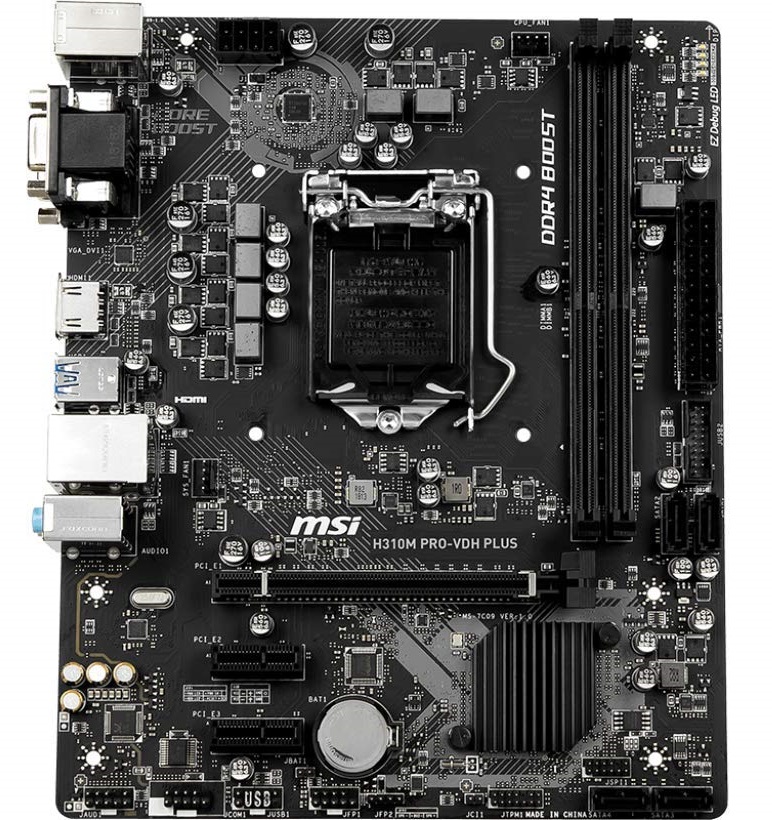
Хотите минимально потратиться — H310 Pro VDH Plus для вас. H310 Pro VDH Plus достаточно для работы i5 9400F, ведь всё что этому процессору нужно для работы — плата на H310 чипсете. На плате 4+2-фазный VRM без всяких радиаторов. Они и не нужны, так как разогнать i5 9400F невозможно.
На плате есть два DIMM слота, в которые можно вставить до 32 ГБ DDR4 2666 Мгц и один PCI-Ex 16 для видеокарты. Также есть два PCI-Ex 1 слота для звуковой или сетевой карты — встроенного Wi-Fi нет. Это примитивная плата с простейшими функциями — не завышайте свои ожидания.
На H310 Pro VDH Plus всего два разъёма для охлаждения, включая процессорный кулер, 4 SATA порта для жёстких дисков и твердотельных накопителей, и, что удивительно, есть EZ Debug LED наверху для отслеживания неполадок. Это хороший набор функций для простой игровой сборки, который не сильно влияет на цену.
Это лучшая материнская плата для Intel core i5 9400f за 60$. Хоть и Gigabyte H310M A конкурирует с H310 Pro VDH Plus, у первой более слабый 2+2-фазный VRM .
2. MSI Pro Series H310I Pro
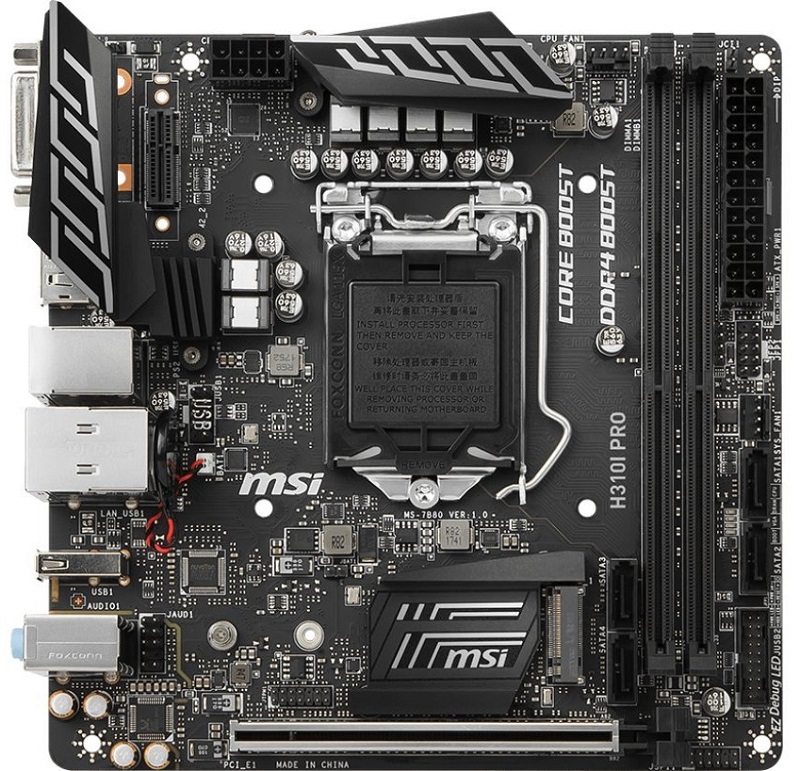
У этой платы MSI есть особенности, которые обошли стороной MSI H310M PRO-VDH Plus . Эта Mini-ITX плата не занимает много места, поэтому можно купить Mini или Micro-ATX корпус. В H310I Pro 6-фазный VRM с радиаторами по бокам — из-за этого нагрев ниже, чем на H310M PRO-VDH.
В этой материнской плате два DIMM слота, поддерживающих до 32 ГБ DDR4 2666 М Г ц памяти и один PCI-Ex 16 для видеокарты. Тут применена технология Steel Armor, поэтому этот слот спокойно удерживает тяжёлые видеокарты. Также тут есть четыре SATA порта и один M.2 для NVME SSD, которого нету в предыдущей материнской плате.
Для интернет соединения можете использовать USB Wi-Fi адаптер или Intel для Е M.2 ключа, который можно подключить к Е-ключу в левой верхней части разъёма.
В отличие от других топовых mini-ITX плат, встроенный, более удобный Wi-Fi отсутствует. Но эта плата намного дешевле, и лучше выбрать её для i5 9400F, так как её цена больше соответствует её функционалу .
3. ASRock B360 PRO4
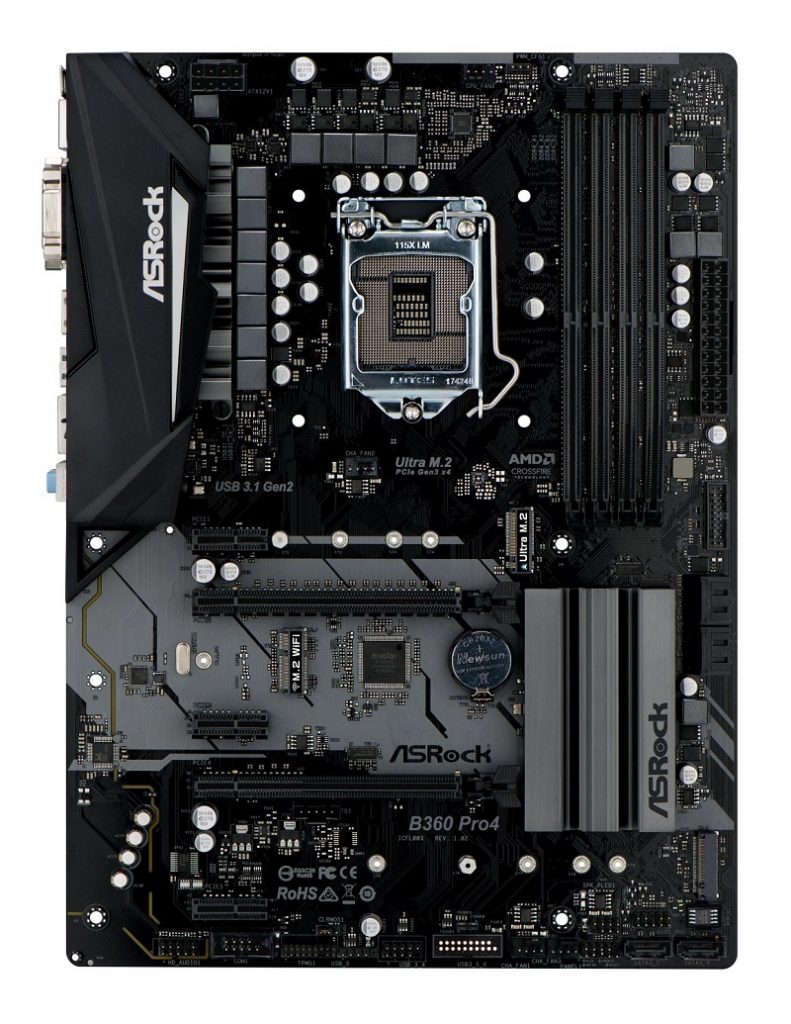
За свою цену, эта материнская плата под intel core i5 9400f — зверь. Хоть чипсет не поддерживает разгон, но в нём намного больше функций. Всё потому, что B360 чипсет был создан для более простого апгрейда системы. Тут 11-фазное питание, которые для большей стабильности в “boost mode” использует метод удвоения. Особенно это полезно при разгоне, но это не наш случай.
Тут целых два M.2 слота для NVME SSD вместе с шестью SATA портами — места у вас будет всегда достаточно. Вы можете установить до 64 ГБ DDR4 266 6 МГц ОЗУ — такое могу т почти все топовые материнские платы среднего ценового сегмента. Тут есть два PCI-Ex 16 слота, которые не поддерживают одновременную работу нескольких видеокарт.
Также тут есть три PCI-Ex 1 для систем охлаждения и карт расширения, всего три разъёма для питания вентиляторов и один для процессорного кулера.
Заключение
У i5 9400F заблокированный множитель, поэтому покупайте материнки на B360 или H370 — их достаточно для этого процессора. Надеемся теперь вам легче определиться какая материнка нужна Intel core i5 9400f. С любой такой материнской платой вы уложитесь бюджет из 600-700$, и поставит е в компьютер что-то вроде GTX 1660 Ti.
The 8 Best Motherboards for Intel Core i5 9400F

Though the i5 9400F is a relatively old processor, it still runs modern games and apps like a charm. But like any processor, it can only unleash its top performance if paired with a good motherboard. With dozens of options on the market, choosing the best motherboard for the i5 9400F can be a bit challenging.
In this article, we’ve reviewed the 8 top motherboards for the Intel core i5 9400F to help you find the right one for your setup. Plus, a detailed buying guide is in place to help you make an educated decision.
With that said, let’s dive in.
Quick Picks
If you’re in a hurry, here are our top motherboards for i5 9400F:
This motherboard offers high-end performance for overclocking and gaming. It packs 2.5Gbps ethernet, WiFi 6, 3 M.2 slots for NVMe SSDs, and a robust power delivery system to make it the best motherboard for Core i5 9400F.
This motherboard offers a solid range of features and capabilities for a mid-range price. It has an enhanced power solution, fantastic audio, and excellent cooling options making it a runner-up for the i5 9400F.
Budget Pick: MSI Z390-A PRO
This motherboard offers high performance for gaming and overclocking. It features dual GbE LAN, WiFi 6, three PCIe slots, six SATA ports, and one U.2 port making it the best budget motherboard for the i5 9400F.
Which Motherboards Are Compatible With Core i5 9400F?
The Intel Core i5–9400F is a 6-core, 9th-generation processor with the LGA 1151 socket. Motherboards with an LGA 1151 socket and an appropriate chipset are compatible. The Intel B365, H310, H370, B360, Z370, and Z390 are popular chipsets that support the i5–9400F processor.
Intel 300-series chipsets are recommended with this processor for optimal performance and compatibility. But you can also get away with a motherboard with a supported 400-series chipset, provided it offers good enough performance and other features.
That said, carefully check your motherboard’s chipset before making a purchase to ensure it’s compatible with your processor. Let’s now explore the top i5 9400F motherboards.
Reviewing the Best Motherboards for i5 9400F
This motherboard is top-of-line due to its high performance for gaming and overclocking.
It has various connectivity options like 2.5Gbps Ethernet for faster data transfer speeds. Plus, it packs WiFi 6 to provide excellent online gaming experiences by supporting ultrafast wireless-networking speeds.
You also get three M.2 slots for NVMe SSDs. Plus, it supports up to 128 GB of DDR4 memory, ensuring your PC never runs out of RAM (memory).
Additionally, it features a robust power delivery system to provide reliable power even when pushing the CPU to its maximum speed.
While this motherboard offers impressive features, it comes at a premium price tag. After careful evaluation, it’s easy to say this motherboard is worth the price. Still, its cost may be steep for some users. Nevertheless, it’s an excellent choice for people seeking a high-quality motherboard for their powerful setups.
- Great performance
- Decent connectivity options
This motherboard is a great mid-end option with an excellent balance between features and price. Speaking of the features, it packs 4 SATA 3 ports for conventional storage drives and 2 M.2 slots for NVMe SSDs. It has two Type-C ports and a total of six USB 3.1 ports.
This motherboard also features a high-speed Intel 1219V Gigabit LAN for fast-speed Internet and a Realtek ALC892 7.1 channel audio codec for high-quality audio. Moreover, it packs multiple fan headers to ensure you can set up a great thermal system for consistent performance.
Another decent feature of this motherboard is its integrated RGB header that lets you add RGB lights to your build. It offers an enhanced power solution to provide better power efficiency.
Moreover, this motherboard also supports Intel’s Optane memory technology for high-speed data access and improved system performance.
However, this motherboard lacks a couple of premium features, like support for WiFi and thunderbolt ports. But if you don’t want to pay extra for these features, it might be the most suitable motherboard for your Core i5 9400F build.
- Value for money
- Amazing audio
- Supports RGB lighting
- Lacks WiFi
- No thunderbolt support
This budget-friendly motherboard is ideal for someone wishing to build a system that can support future upgrades.
Despite the affordable price, it has all the features an enthusiast can ask for, like a lot of storage with RAID options and an integrated LAN connector. Moreover, its audio boost comes with an HD audio processor to provide premium sound output.
This motherboard supports the newest technologies like USB 3.1 Gen 2, DisplayPort 1.4, HDMI 2.0, dual GbE LAN, and WiFi 6 — ensuring maximum data transfer speeds. It also packs three PCIe slots, six SATA slots, and one U.2 port for SSDs.
Though it’s a fantastic motherboard for the price, it offers limited overclocking options, which makes it more suitable for beginners and everyday users. Overall, we believe it’s the best budget motherboard for Intel Core i5 9400F, thanks to its fast-speed WiFi, versatile connectivity options, and affordable price.
- Supports WiFi 6 networking
- U.2 slot for SSD drives
This is an affordable gaming motherboard for the Intel core i5 9400F. Its premium features make it ideal for gamers and power users.
This motherboard features Intel Gigabit LAN to provide fast-speed wired Internet. Plus, it supports 6 SATA 3 ports for conventional storage options. Thanks to its 7.1 channel HD audio and ELNA audio capacitors, it also provides an amazing audio solution.
Apart from that, this motherboard’s VRM section features an eight-phase power design with voltage regulators to provide smooth power delivery to the CPU. A single 8-Pin 12V connector powers the power design.
This board has plenty of USB 3 ports with a data transfer rate of 5 GBPS for connectivity. Plus, it supports USB Type-C ports for your Type-C accessories. You also get an M.2 slot for the WiFi module and another for your NVMe SSD drive.
The drawbacks of this board are it has limited overclocking and expansion options, so be considerate of your requirements when choosing this motherboard. Still, it’s one of the best motherboards to pair up with Intel Core i5 9400F for gaming.
- Budget-friendly
- Multiple M.2 slots
- Decent performance
This motherboard fits users who need more processing power than the core i5 9500F can provide. It has solid features and performance for its price.
You also get various USB ports, including USB 3.1 Gen2 & USB 3.0. The support for Thunderbolt 3, WiFi 6, and Bluetooth 5.0 is another significant addition. Moreover, its 7.1 surround sound audio enhances the audio experience.
It has 6 SATA III ports and 2 M.2 slots for NVMe SSDs that offer plenty of storage options. Furthermore, the motherboard includes a user-friendly BIOS with a modern interface that makes it simple to navigate and configure.
It also supports Gigabyte’s Ultra Durable technology, which includes features such as a 2-ounce copper PCB, solid-state capacitors, and corrosion-resistant connectors to ensure long-term stability and reliability.
This board also offers basic overclocking features, so if you’re seeking advanced overclocking, then this board is not for you. Concluding, this is a good choice for someone who wants a reliable and feature-packed ATX motherboard at an affordable rate.
- Value for money
- Great connectivity options
This Micro-ATX motherboard is ideal for users looking to build a budget PC for everyday use. It has 4 DDR4 memory slots and can support up to 64GB of RAM at a maximum frequency of 2666 MHz.
For connectivity, it features Gigabit LAN, 7.1 CH HD Audio, and a variety of USB ports, including USB 3.1 Gen1 and USB 2.0. In terms of storage, you get 6 SATA III ports and an M.2 slot for NVMe SSDs.
As this board has multiple PCIe slots, you get expansion options for various components, such as graphics cards and storage drives. Many SATA slots are in place, too, for your traditional storage drives.
But on the flip side, the bad thing about this motherboard is its voltage regulators, and M.2 slots lack a heat sink. Still, it offers a decent cooling design to ensure your computer stays cool. Other than that, its B365 limits overclocking capabilities of its memory modules and processor.
Overall, it’s a decent Micro-ATX motherboard for Intel Core i5–9400f, thanks to its various connectivity options and low price.
- Reliable performance
- Ample expansion options
- Lots of USB ports
Packing high-end features, this motherboard is designed with enthusiasts and professional gamers in mind.
It packs 4 DDR4 RAM slots that support up to 64GB of memory, making it suitable for high-performance apps and processes. It also offers multiple PCIe and SATA slots, allowing for a wide range of expansion options.
Other than that, its advanced overclocking capabilities include support for 5-Way Optimization that lets you fine-tune your computer for optimal performance. It also offers wireless connectivity options like WiFi and Bluetooth, making it a complete package for Intel Core i5 9400F.
Moreover, this motherboard packs Aura Sync RGB lighting to let you personalize your system and give it an appealing look.
But note that compared to other high-end motherboards, its BIOS is a bit complex. It also has limited upgradeability options, which may be a disadvantage if you want to upgrade your system in the future.
Overall, if you want a top-performing motherboard for Intel Core i5 9400F with premium features at a reasonable price, this motherboard is a great way to go.
- High-end performance
- Advanced overclocking options
This motherboard is unquestionably a great option to consider for the i5 9400f, but it will not run this processor at full turbo, so keep that in mind before purchasing it for your build.
It has two USB 3.1 Gen1 ports on the front panel and four Type-A ports on the rear IO panel for connectivity. However, the lack of a USB Type-C port is disappointing. With multiple PCIe slots and SATA ports, this motherboard offers plenty of expansion options for various components.
This motherboard also has a user-friendly BIOS, making it simple for users to set up and configure their system. It also supports GIGABYTE’s Smart Fan 5 to give users advanced fan control options for keeping their system cool and quiet.
Although it lacks built-in WiFi and support for overclocking, it’s a great mid-range motherboard for Core i5 9400F thanks to its reliable performance, user-friendly BIOS, and affordable price.
- Value for money
- Supports GIGABYTE’s Smart Fan 5
- User-friendly BIOS
Things to Consider When Choosing a Motherboard for i5 9400F
Socket and Chipset Compatibility
Compatibility between a motherboard and a processor is crucial because it determines whether the two components can work together. The socket and chipset are two critical factors that influence compatibility, and they must be considered before purchasing a motherboard for any processor.
The socket is the physical interface on the motherboard to which the processor is connected. As Intel Core i5–9400F packs the LGA 1151 socket, you must ensure that the motherboard you buy has the same socket.
Moreover, the chipset is the underlying electronics that control communication between the processor and other motherboard components. The i5–9400F processor is compatible with motherboards with Intel 300-series and some 400-series chipsets. When selecting a motherboard for i5–9400F, ensure it has one of these compatible chipsets.
Memory Support
The Intel Core i5–9400F processor supports DDR4 memory. When selecting a motherboard, make sure it’s based on the DDR4 memory standard. Also, ensure it has enough RAM slots and RAM limit to support the amount of RAM you want to install. Motherboards with 64–128GB memory limit are recommendable for most users.
Moreover, memory speed is another important thing to consider when choosing a Core i5–9400F motherboard. The Core i5–9400F supports a memory speed of up to 2666 MHz, though some motherboards support higher speeds. If you want to use faster memory, you should select a motherboard with support for that speed.
Storage Support
When selecting a motherboard, ensure it has the necessary interfaces to support the type of storage you plan to use. Since the Intel Core i5–9400F supports SATA and NVMe storage, you should select a motherboard that also supports these types of storage.
Most motherboards have at least one or two SATA ports, but you may require more depending on the number of storage devices you intend to use. If you want to use an NVMe SSD, ensure your motherboard has M.2 slots too.
Connectivity
Connectivity refers to your computer’s ability to connect with other devices and the Internet. The Intel core i5 9400F comes with integrated graphics, but you may want to install a dedicated graphics card for better graphics performance. In this case, we strongly recommend a motherboard with a PCIe x16 slot for the graphics card.
Moreover, ensure the motherboard you choose has a fast-speed Ethernet port or built-in WiFi (or both) to connect your computer to the Internet seamlessly.
Also, choose a motherboard with enough USB ports to support your devices. If you have USB Type-C peripherals, it’s preferable to opt for a motherboard with USB Type-C ports.
Overclocking Support
If you want to overclock your processor, invest in a motherboard that supports overclocking. Motherboards that support overclocking tend to have overclocking-friendly features like voltage control and multiple fan headers.
Before you get an overclocking-supported motherboard, note that i5–9400F is a locked processor and cannot be overclocked. You can still consider an overclocking-supported motherboard for future-proofing.
Note: Before overclocking your CPU, understand the ins and outs of overclocking and ensure your system has proper cooling.
Is Core i5 9400F a Good Processor?
Yes, the Intel Core i5–9400F is a good processor, as it offers decent performance for its price.
This 9th generation processor packs six cores and six threads to handle most every day and demanding tasks like a charm. Thanks to its fast base clock speed of 2.9GHz, it’s a good choice for gamers. Plus, it supports Intel’s Turbo Boost technology, which can further boost the clock speed to 4.1GHz.
The “F” in the i5–9400F indicates that this processor lacks integrated graphics, making it an excellent choice for budget gaming builds that rely on dedicated graphics cards.
Overall, the Intel Core i5–9400F is an excellent mid-range processor for general computing, gaming, and even light content creation work.
FAQs on Intel Core i5–9400F Motherboards
Is it necessary to have an M.2 slot on the motherboard for i5 9400F?
No, it’s not essential to have an M.2 slot in the motherboard for an Intel Core i5–9400F processor. M.2 slots are mostly used to add high-speed storage devices to a computer, like SSD drives. You can also connect storage drives to your computer through SATA slots, so M.2 slots are not required for the i5–9400F processor to function.
What chipset is i5–9400F?
The Intel Core i5–9400F supports motherboards with Intel 300-series and a few 400-series chipsets. The chipset will vary depending on the motherboard, but standard options include the H310, B360, H370, and Z390. When choosing a motherboard i5–9400F, ensure it has one of these chipsets to run this processor effortlessly.
What is the best motherboard for the i5 9400F?
ASUS ROG Strix Z490-E Gaming is the best motherboard for i5 9400F, thanks to its incredible connectivity options, high-end performance, and decent cooling system. If you’re seeking a cheap motherboard for i5 9400F, ASUS Prime Z390-P may be a better choice as it provides the essential features for an affordable price.
Are VRMS of H310 and B365 sufficient for Core i5 9400f?
Yes, the voltage regulator modules (VRMs) of both the H310 and B365 chipsets are sufficient for the Intel Core i5–9400F processor. The VRMs provide stable power to the CPU, and both the H310 and B365 chipsets have adequate VRM designs to support the i5–9400F.
Is the i5–9400F good for gaming?
Yes, the Intel Core i5–9400F is a good choice for gaming. As a 9th-generation Coffee Lake processor, it provides solid gaming performance and can handle the most demanding games at 1080p resolution with smooth FPS. However, the performance of the i5–9400F depends on other components in your system, such as the graphics card, memory, and storage.
Final Words
Though the Intel Core i5–9400F is getting old, it’s still a good processor for gaming, content creation, and everyday tasks. We hope this guide helped you find the best motherboard for your Core i5–9400F processor. If you need clarification, feel free to ask away your queries in the comments below!
Лучшие материнские платы для Intel Core i5-9400F
Новый процессор Intel Core i5-9400F предлагает действительно хорошие характеристики и что самое интересное, за адекватные деньги. Множество материнских плат разных ценовых категорий поддерживают Intel Core i5-9400F. Если же сравнивать характеристики, то i5-9400F как и i5-9600K предлагает 6 ядер и только 6 потоков. Основное отличие текущих процессоров заключается в рабочих частотах и собственно ценах.
Эта статья содержит список лучших материнских плат для Intel Core i5-9400F. Текущий процессор не имеет разблокированного множителя, который позволил бы дополнительно с помощью разгона увеличить производительность. Это позволяет пользователю сэкономит несколько тысяч не только на процессоре, но и на материнской плате, выбрав более дешёвый чипсет.
Какую материнскую плату выбрать для i5-9400F
С точки зрения покупки материнской платы, теоретически, серия Intel 300 может использоваться с процессором i5-9400F. Однако, материнская плата с чипсетом H310 начального уровня имеет низкое расположение. Как правило, рекомендуется использовать процессоры серии Pentium или Celeron.
Материнские платы высокого класса Z370 и Z390 поддерживают разгон. Они лучше всего подходят для моделей процессоров с индексом K — с поддержкой разгона. Чипсета B360 будет более чем достаточно для сборки компьютера на процессоре i5-9400F.
Важно! В любом случае помните, даже после выбора материнской платы любой ценовой категории рекомендуем перейти на сайт производителя и убедится, что этот процессор поддерживается. Весь список поддерживаемых процессоров материнской платы указывается на официальном сайте.
Лучшие материнские платы для Intel Core i5-9400F
Gigabyte B360M DS3H
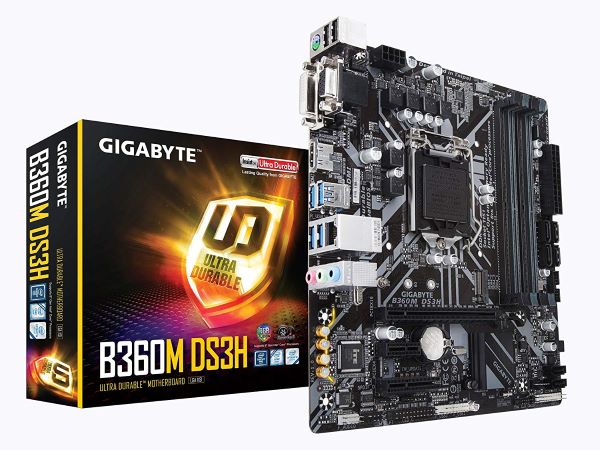
- Форм-фактор: microATX
- Тип разъёма: Socket 1151-V2
- Чипсет: Intel B360
- Поддержка процессоров: Intel Core i7/Intel Core i5/Intel Core i3/Intel Pentium/Intel Celeron 9-го и 8-го поколения
- Объём оперативной памяти : 64 ГБ с частотой до 2666 МГц
- Две и более видеокарты: Нет
Действительно, бюджетная материнская плата с форм-фактором microATX поддерживает процессоры 9-го и 8-го поколения Intel Core. Несмотря на свои размеры материнская плата позволяет установить 4 слота оперативной памяти DDR4 (до 64 ГБ) и твердотельный накопитель M.2. Могу смело рекомендовать материнскую плату к покупке, если Вы не готовы переплачивать за подсветки и прочие уловки маркетологов.
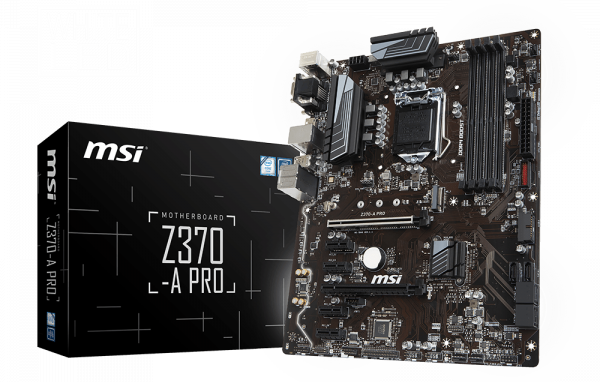
MSI Z370-A PRO
- Форм-фактор: ATX
- Тип разъёма: Socket 1151-V2
- Чипсет: Intel Z370
- Поддержка процессоров: Intel Core i7/Intel Core i5/Intel Core i3/Intel Pentium/Intel Celeron 9-го и 8-го поколения
- Объём оперативной памяти : 64 ГБ с частотой до 4000 МГц
- Две и более видеокарты: AMD 2-Way CrossFire
В характеристиках можно увидеть, что материнская плата формата ATX имеет поддержку процессоров Intel Core 8-го поколения. На сайте производителя указывается поддержка процессоров 9-го поколения. Она появится после обновления версии BIOS. Материнская плата предназначена для построения высокопроизводительных домашних и игровых систем, может использоваться в качестве основы рабочих станций начального уровня.
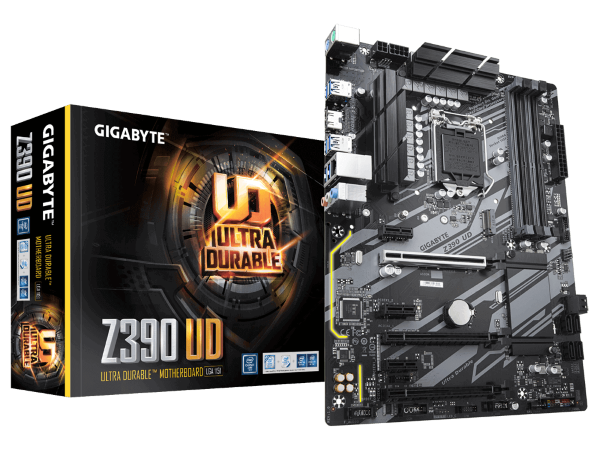
Gigabyte Z390 UD
- Форм-фактор: ATX
- Тип разъёма: Socket 1151-V2
- Чипсет: Intel Z390
- Поддержка процессоров: Intel Core i7/Intel Core i5/Intel Core i3/Intel Pentium/Intel Celeron 9-го и 8-го поколения
- Объём оперативной памяти : 128 ГБ с частотой до 4266 МГц
- Две и более видеокарты: NVIDIA Quad SLI, AMD Quad CrossFireX
Материнская плата GIGABYTE Z390 UD на топовом чипсете Intel Z390 поддерживает процессоры 9-го и 8-го поколения Intel Core i9/Intel Core i7/Intel Core i5/Intel Core i3/Intel Pentium и Intel Celeron без необходимости танцев с бубном. На будущее стоит отметить, что подсистема питания и охлаждение позволяют стабильно работать ПК при разгоне процессора до 5 ГГц. Отсутствует подсветка, второй интерфейс M.2 и порты USB 3.1 Gen 2.
Реальные тестирования процессоров показывают, что Intel Core i5-9600K показывает похожую производительность в сравнении с i5-9400F. Это делает процессор i5-9400F оптимальным выбором для игрового компьютера начального уровня. Основные отличия с прямым его конкурентом содержаться в уменьшенной рабочей частоте, заблокированном графическом ядре и множителем.
Материнскую плату можно выбрать различных ценовых категорий. Если же есть возможность выбирайте её с запасом на будущее. При необходимости смотрите на дополнительные возможности платы (частоты и объём оперативной памяти, наличие нескольких интерфейсов M.2, поддержка SLI/CrossFireX и другие). На самом деле для процессора i5-9400F больше чем достаточно материнской платы с чипсетом B360 или Z370.
Добротная сборка на Intel Core i5 — 9400F и nVidia GeForce GTX1660 Super за 44970 рублей
Ни для кого не секрет, что рынок процессоров стремительно захватывают AMD Ryzen. За одну и ту же цену они предлагают больше потоков, чем процессоры Intel. И все бы хорошо, но кого-то отпугивают «танцы с бубном», которые могут потребоваться при покупке AMD Ryzen.
Начиная от необходимости прошивки нового БИОС при покупке материнской платы на прошлых чипсетах и заканчивая долгой настройкой оперативной памяти и планов питания (по желанию).
А процессоры Intel, как и раньше, предлагают эксплуатацию без проблем, по принципу «поставил и забыл».
Не стоит забывать и о большей производительности на ядро. Поэтому списывать процессоры Intel со счетов еще рано.
реклама
В этом блоге я постараюсь подобрать детали так, чтобы сборка была максимально производительной за небольшие деньги. В качестве магазина, как обычно, выбираю Регард.
Эту сборку я начну с корпуса. Не терпится похвалиться вам интересной и недорогой находкой.
AeroCool CS-105 Blue, всего за 1840 рублей. У него есть и прозрачная боковая стенка, и подсветка синего цвета, и интересный дизайн.
Есть модель с подсветкой красного цвета, но в сборку с Intel я взял корпус с голубым свечением. Красная подсветка хорошо подойдет под сборку на AMD.


реклама
Внутри корпус довольно консервативен, но может легко вместить длинные видеокарты.

Сердцем нашей сборки будет процессор Intel Core i5 — 9400F. Популярность этой модели сейчас на высоте. Покупатели расхватывают их как горячие пирожки. Шесть мощных ядер обеспечивают приемлемую кадровую частоту во всех играх, а большего и не надо.

реклама
Покупая шестиядерник от Intel менее, чем за 11000 рублей, не забывайте сказать за это спасибо AMD и Ryzen. Если бы не они, такие процессоры стоили сейчас бы почти 20000 рублей!
Материнскую плату для него беру недорогую: Gigabyte B365M D2V. Все, что нужно иметь современной материнской плате, у нее есть.
Особенно радуют шесть SATA портов. В этом ценовом сегменте это редкость.

реклама
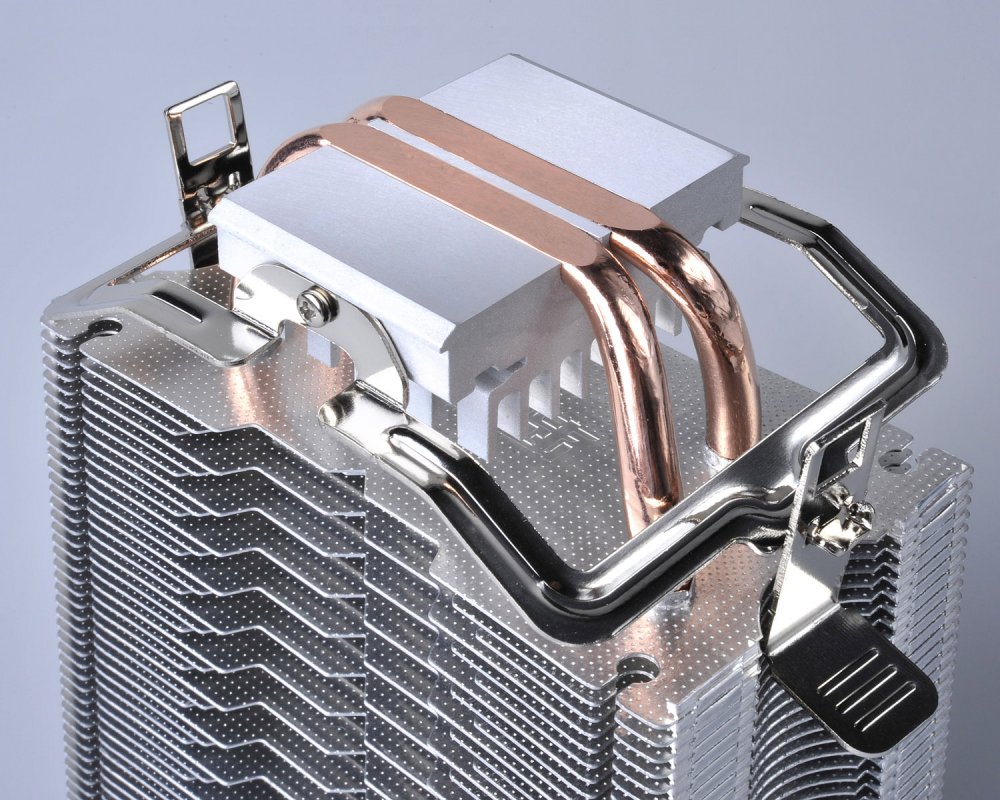
Несмотря на низкий TDP, шестиядерник от Intel требует качественного охлаждения на теплотрубках, поэтому я беру хорошо себя зарекомендовавший кулер PCcooler S93.
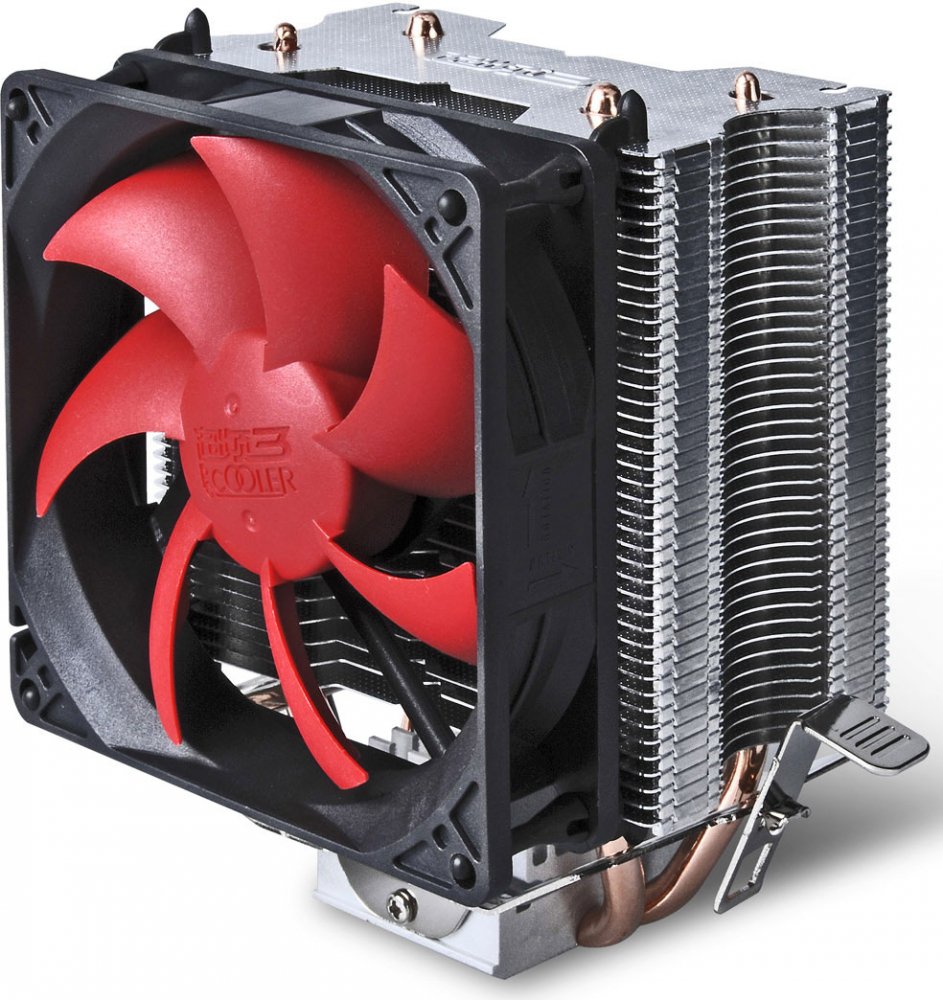
Две теплотрубки имеют прямой контакт.
Оперативная память стремительно дешевеет и две планки DDR4 GOODRAM по 8 ГБ, с частотой 2666 МГц, обойдутся всего в 4280 рублей! А ведь совсем недавно 16 ГБ оперативной памяти среднего качества обходились в заоблачные 10000 рублей.

Видеокарта в сборке будет от компании KFA2 — nVidia GeForce GTX1660 Super KFA2 1-Click OC (60SRL7DSY91K). Новинки с приставкой Super добрались и до среднего сегмента видеокарт. GeForce GTX1660 Super почти догоняет GeForce GTX1660 Ti за счет быстрой памяти.


Критики давно предрекают быстрое моральное устаревание видеокарт с шестью гигабайтами видеопамяти, но пока этого не наблюдается, и все новинки игр в разрешении 1080p отлично укладываются в 6 ГБ.
В такую хорошую сборку нужен соответствующий блок питания — недорогой, но качественный. И это будет Hiper HPA-500, мощностью 500 ватт. Такой мощности вполне хватит для этой сборки, ведь Intel Core i5 — 9400F и nVidia GeForce GTX1660 Super отличаются отличной энергоэффективностью.
Не знаю как вам, но для меня это очень важный параметр.

В своих виртуальных сборках я не использую дорогие блоки питания, чем вызываю вал критики в комментариях. Сейчас объясню почему. Есть довольно четкий рубеж, до которого качество блоков питания среднего уровня примерно одинаково.
То есть, блок питания ценой в 2500 рублей и ценой 5000 рублей, с гарантией в три года, проживут примерно одинаковое время. Потом начнется вздутие конденсаторов, проблемы с дежурным питанием, износ вентилятора и т.д.
И чтобы гарантированно избежать этих проблем, нужно брать дорогой блок питания с сертификацией 80 PLUS Silver, Gold или Platinum. И гарантией не менее пяти лет! Такие блоки питания очень дороги и не подходят в сборки, подобные этой.
Поэтому я придерживаюсь стратегии покупки недорогого, но качественного блока питания и замены его при первых проблемах.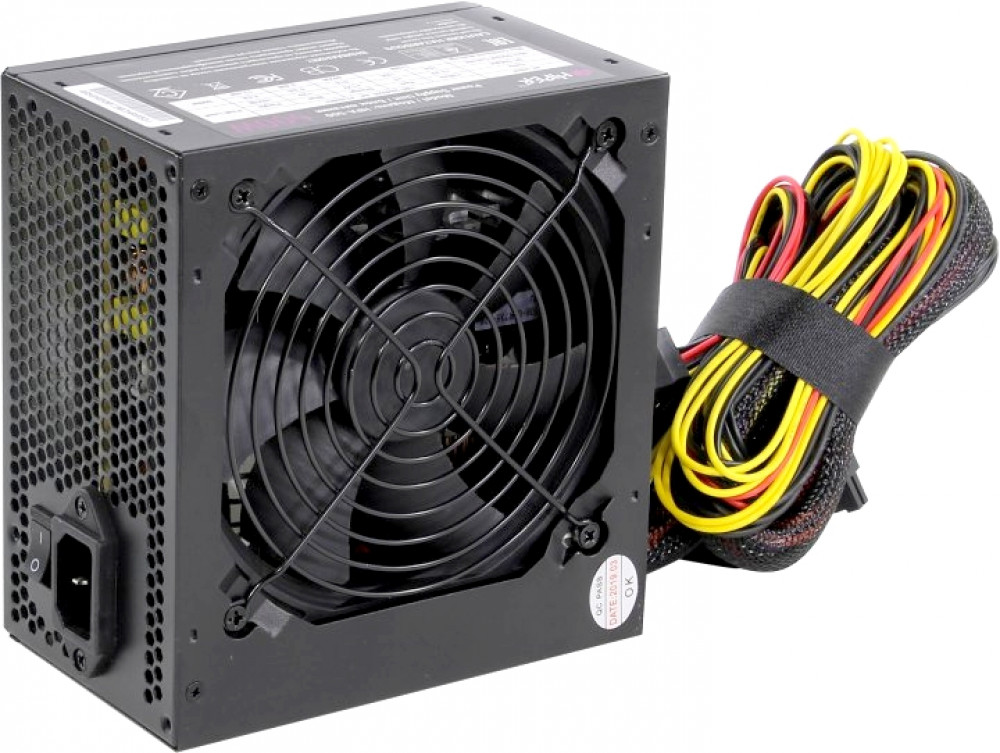
Остается накопитель и это будет 480Gb SSD SmartBuy Revival 3 (SB480GB-RVVL3-25SAT3). Пора отказываться от медленных, шумных и ненадежных жестких дисков в сборках. Недорогие SSD накопители год от года все качественнее и имеют все больший объем.

Ну вот, сборка готова. Я уверен, что все новинки игр в разрешении 1080p будут идти на ней хорошо, включая и недавно вышедший Red Dead Redemption 2.
Уверен, вы найдете какие-то огрехи в моей сборке и напишете про них. Обратная связь с читателями для меня очень важна, например, вот тут мне подсказали, что я забыл в сборке про кулер.